Someone calls in sick on a Monday morning. The manager scrambles to find coverage, realizes two other people already have approved vacation that week, and discovers the PTO spreadsheet hasn’t been updated since last month. Sound familiar?
That’s an absence management problem, and it gets worse as teams grow. Without a clear process, you end up with staffing gaps, payroll miscalculations, inconsistent treatment across teams, and the occasional legal headache when a manager handles an FMLA-protected absence the wrong way.
This guide walks through absence management in practical terms: what it actually covers, how to write a policy, which metrics are worth tracking, and where software replaces the manual work.
What Is Absence Management?
Absence management is the set of policies, processes, and tools a company uses to record planned and unplanned time off, keep work covered, and support employees from the first day of absence through return to work.
It goes beyond simple leave management. Leave management typically handles the mechanics: how employees request time off, how approvals work, and how PTO balances accrue. Absence management is broader. It covers planned leave and unplanned absence (sick days, emergencies, no-shows), plus follow-up actions like return-to-work check-ins, pattern reviews, and prevention strategies.
In practice, absence management touches several areas at once:
- HR operations — tracking who is out, why, and for how long
- Compliance — applying FMLA, ADA, and state leave laws correctly
- Workforce planning — arranging coverage and redistributing tasks
- Employee wellbeing — preventing burnout and catching warning signs before they become chronic absences
The average employee is absent for about 6.9 days per year, with a median cost per absence of $716, according to CIPD Absence Management surveys. At a company level, those numbers compound quickly, making a structured approach worth the effort.
The Real Cost of Absenteeism
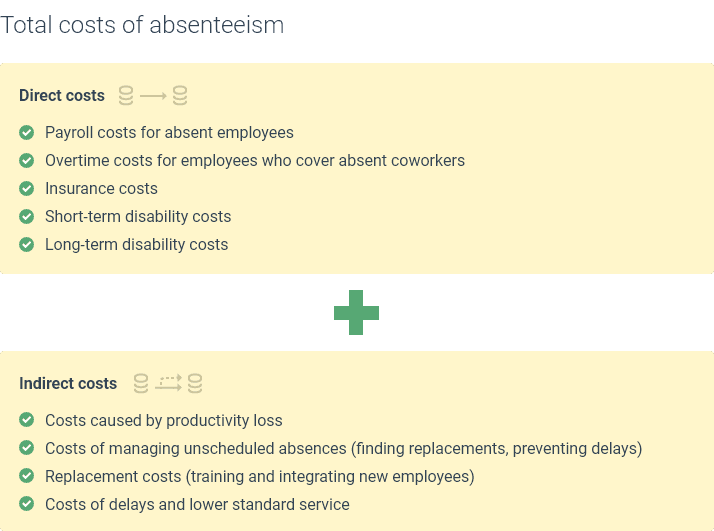
Unplanned absences are more expensive than they look on a timesheet. In the US, productivity losses linked to absenteeism have been estimated at $225.8 billion annually. That figure includes direct costs (wages paid for hours not worked, overtime for colleagues covering shifts, temporary hires) and indirect costs (missed deadlines, lower team morale, management time spent rearranging schedules).
But focusing only on absenteeism misses the other side of the problem: presenteeism. Presenteeism happens when employees show up while sick, overwhelmed, or dealing with personal crises because they fear disciplinary consequences or don’t want to burden their team. Research suggests presenteeism costs businesses even more than absenteeism, and the worst part is that those costs are largely invisible.
An effective absence management policy addresses both sides: it reduces unnecessary absences without creating a culture where people feel punished for taking legitimate time off.
Types of Employee Absences
Before you can manage absences, you need to classify them. Most absences fall into four categories:
| Type | Examples | Management Approach |
|---|---|---|
| Planned and approved | Vacation, parental leave, sabbatical | Standard request and approval workflow; advance scheduling |
| Unplanned but legitimate | Sick days, family emergency, bereavement | Same-day notification rules; coverage arrangements; return-to-work check |
| Legally protected | FMLA leave, ADA accommodation, jury duty, military service | Compliance-first; documentation requirements; no disciplinary triggers |
| Unauthorized or patterned | No-call no-show, habitual Monday absences, extended breaks | Trigger-point review; formal conversation; disciplinary process if needed |
Each type calls for a different response. Treating a family emergency the same way you treat a pattern of unexplained no-shows is unfair and legally risky. Your absence management policy should spell out how the company handles each category so managers apply the rules consistently.
How to Create an Absence Management Policy
A written absence management policy is worth having even for teams of three to five people. Without one, managers make ad hoc decisions that shift depending on who’s asking, which creates inconsistency and, eventually, complaints.
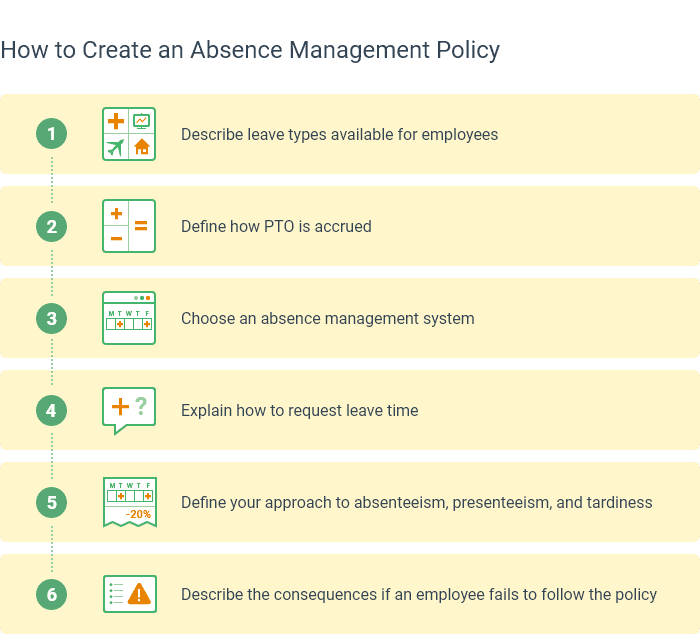
Here is what a complete policy should include:
1. Define what counts as each absence type. Describe what qualifies as absenteeism, tardiness, and presenteeism in your organization. Be specific: “arriving more than 15 minutes after shift start without prior notification” is clearer than “being late.”
2. Set reporting procedures. Employees should know who to notify (direct manager, HR, or an automated system), when (before shift start, within one hour), and how (phone call, app notification, email). Include what the notification must contain: expected duration, whether urgent coverage is needed, and whether documentation will follow.
3. Establish an approval workflow. Outline how planned leave requests are submitted, who approves them, and how far in advance they must be filed. Specify what happens when multiple team members request the same dates.
4. Describe your tracking system. Explain where absences are recorded, whether that is a spreadsheet, HR platform, or dedicated absence management tool. Employees should know how to check their own PTO balances and leave history.
5. Specify leave types and accrual rules. List every leave type the company offers (vacation, sick, personal, bereavement, jury duty, etc.), how each accrues, whether carryover is allowed, and what happens to unused balances at year end. Be explicit about whether employees can go into negative balance.
6. Set trigger points for review. Many companies use thresholds: for example, three unplanned absences within a rolling 90-day period, or any single absence longer than five consecutive days. When a trigger is hit, the manager schedules a conversation to understand the situation and offer support. These are not automatic penalties. They are checkpoints.
7. Define return-to-work procedures. After any absence over a certain length, the manager should have a short check-in on the first day back: is the employee ready to return, are any accommodations needed, and is there follow-up documentation?
8. Include preventive and supportive measures. List what the company offers to reduce absences at their root: flexible work arrangements, employee assistance programs (EAPs), wellness initiatives, or workload redistribution during busy periods. Your policy should acknowledge that many absences result from burnout, caregiving responsibilities, or unaddressed health issues, not willful disengagement.
Absence Management Best Practices
The companies with the lowest unplanned absence rates are rarely the ones with the strictest policies. They’re the ones that treat people like adults and fix the root causes, whether that’s workload, bad scheduling, or a manager who makes taking a sick day feel like a performance review.
Communicate expectations early. Cover absence policies during onboarding, not buried in an employee handbook nobody reads. Revisit them annually. Employees who know the rules are less likely to violate them accidentally.
Train managers on consistency. The biggest compliance risk in absence management is not the policy itself but uneven application. One manager who ignores Monday absences while another writes people up for the same thing creates legal exposure and team resentment. Equip managers with templates, scripts for difficult conversations, and clear escalation paths.
Reward attendance without penalizing legitimate time off. Some companies offer additional PTO, small bonuses, or recognition for employees with strong attendance records. This works when the incentive rewards reliability rather than punishing people for using their earned leave.
Track patterns, not just numbers. The absence rate alone tells you very little. Look for clusters: are absences concentrated on certain days, in certain teams, or during specific project phases? Patterns often point to workload issues, management problems, or scheduling conflicts that you can fix.
Automate what you can. Manual tracking in spreadsheets breaks down as teams grow. Automated absence management systems reduce errors in PTO calculations, send approval reminders, and generate reports that surface patterns before they become problems.
Separate sick leave from vacation in your analysis. Lumping all absences into one metric makes it impossible to identify whether you have an engagement problem, a health problem, or a policy problem. Track them separately and respond to each with the appropriate intervention.
What to Look for in Absence Management Software
A policy is only as good as the system enforcing it. Spreadsheets work when you have five people. At 15, someone will overwrite a formula, forget to log a sick day, or approve leave without checking who else is already out that week. The alternatives are timesheet tools with absence features, HR platforms with leave modules, and dedicated absence management software.
Here is how these options compare on the features that typically break first as teams scale:
| Feature | Spreadsheets | Automated Systems |
|---|---|---|
| Accuracy | Low (prone to human error) | High (automated calculations) |
| Real-time visibility | No (data is often outdated) | Yes (instant updates) |
| Employee self-service | No (email or paper requests) | Yes (mobile and web apps) |
| Reporting | Difficult (manual compilation) | Instant (automated dashboards) |
| Scalability | Low (unmanageable with growth) | High (scales with your team) |
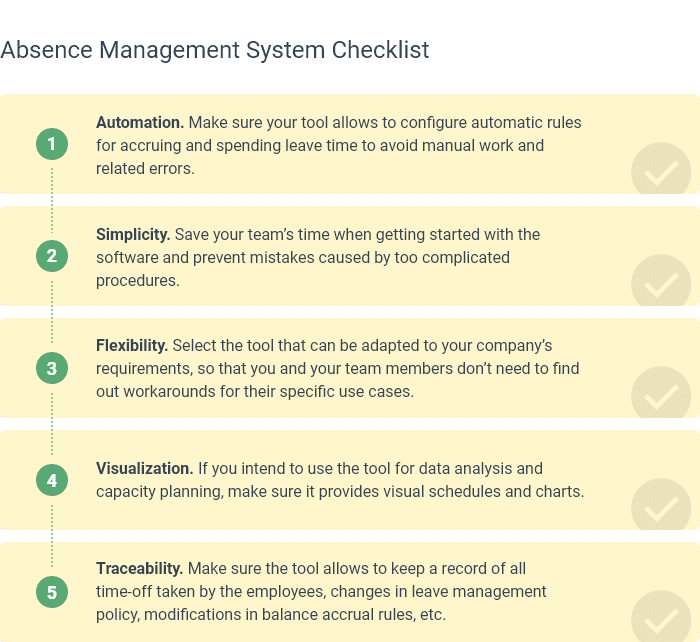
When evaluating software, prioritize: self-service leave requests so employees don’t chase managers over email, automated PTO accruals that match your policy rules, a team calendar or timeline for spotting coverage gaps, and exportable reports for payroll and compliance audits.
How actiPLANS Simplifies Absence Management
actiPLANS is a leave management system built for absence tracking, PTO calculations, and team availability. It is not an HR suite with a leave module tacked on. The entire product is built around the workflow described in this guide: request, approve, track, report.
Visual absence timeline. See who is out, who is scheduled for time off, and where coverage gaps exist, all on one screen. Managers can plan around upcoming absences instead of reacting to them.

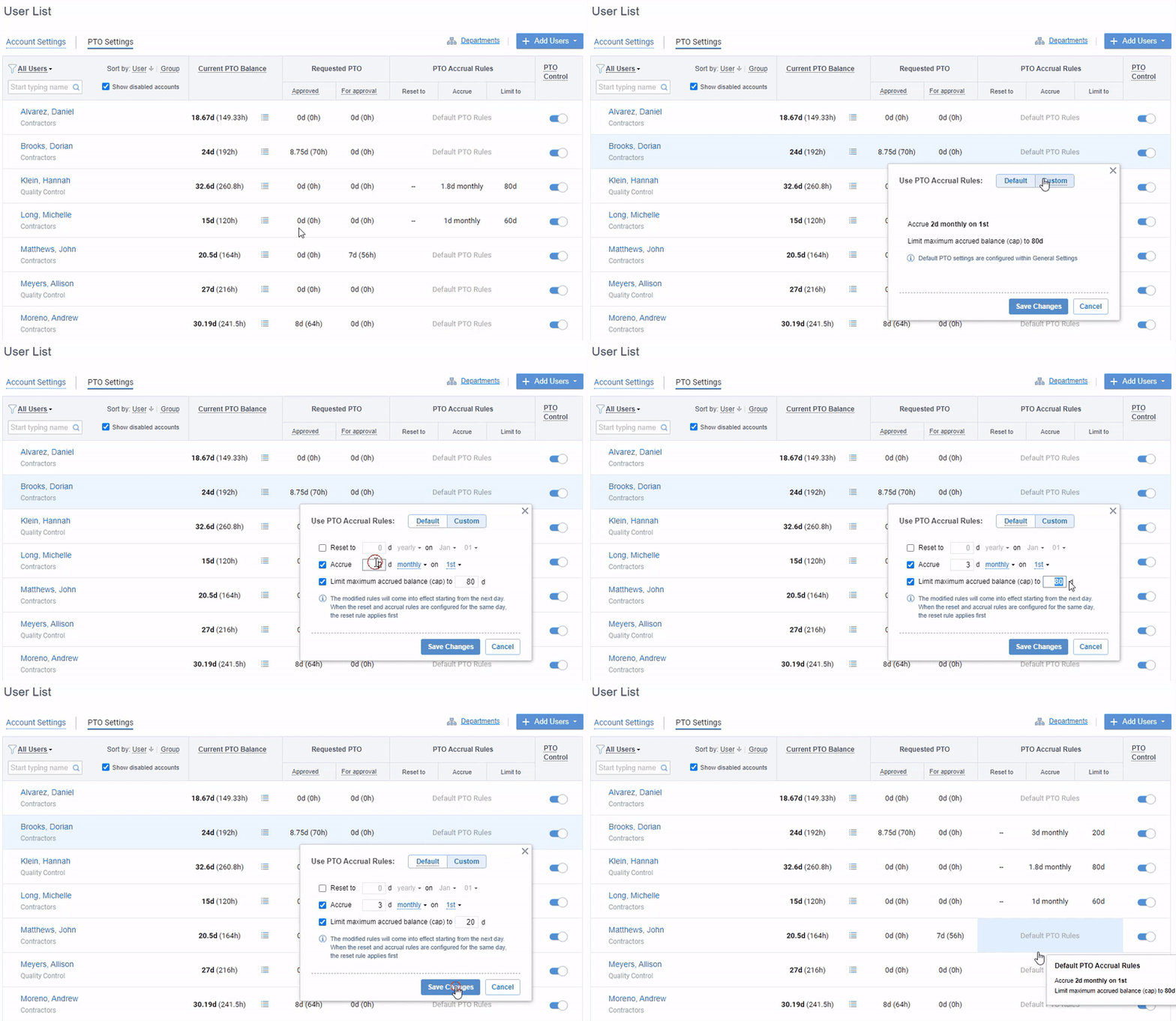
Custom leave types and accrual rules. Configure as many leave types as your policy requires (vacation, sick, personal, bereavement, and any custom category). Set automatic accrual rules, yearly resets, carryover caps, and negative balance permissions to match your policy exactly.
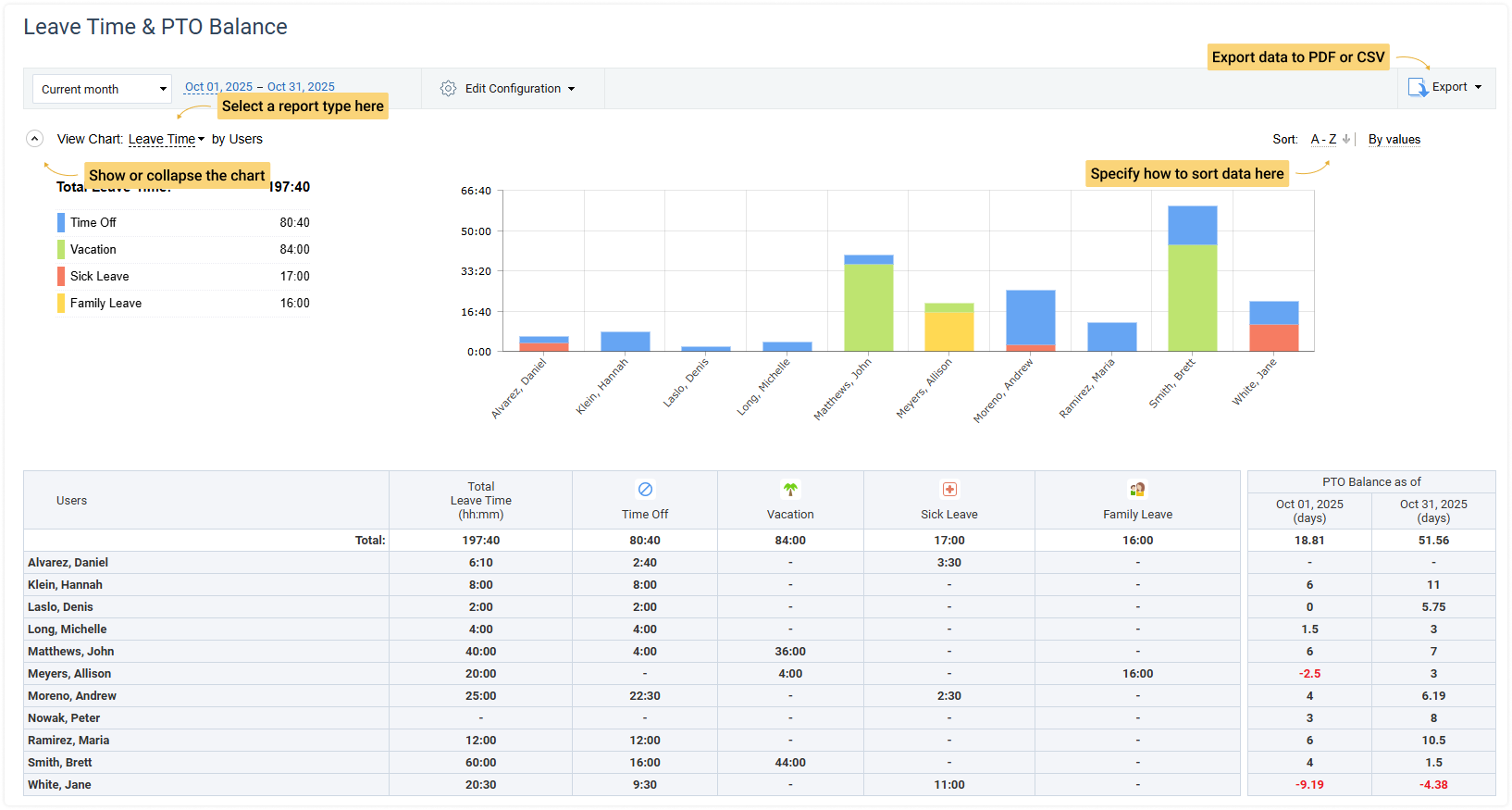
Leave reports and analytics. Pull reports on leave balances, past absences by type, and team-level trends. Export data as CSV or PDF for payroll or compliance. The reporting is where pattern detection happens: you can see which teams have the highest unplanned absence rates, which months generate the most requests, and whether trigger points are being hit consistently or ignored.
Mobile app and self-service. Employees request leave and report absences from their phone. Managers approve or decline with one tap. No more email chains, paper forms, or “please close the spreadsheet so I can edit it” requests.
Integration with actiTIME. For companies that need both absence management and time tracking, actiPLANS syncs with actiTIME so leave data and work hours live in one connected system.
FAQ
What is included in absence management?
Absence management typically includes rules for reporting and approving time off, a system for recording planned and unplanned absences, return-to-work procedures, pattern reviews using trigger points, and preventive measures like wellness programs or flexible scheduling. It also covers compliance with labor laws (FMLA, ADA, state leave requirements) and the disciplinary process for unauthorized absences.
What is the difference between absence management and leave management?
Leave management focuses on planned time off: how employees request it, how it gets approved, and how PTO balances accrue. Absence management is broader. It includes leave management plus unplanned absence handling (sick days, emergencies, no-shows), follow-up actions, pattern analysis, and prevention strategies.
What are the four types of employee absences?
The four main categories are: planned and approved (vacation, parental leave), unplanned but legitimate (illness, family emergency), legally protected (FMLA, jury duty, military service), and unauthorized or patterned (habitual no-shows, unexplained absences). Each type requires a different management response.
How do you measure employee absence?
Start with three metrics: absence rate (total absence days divided by total working days), frequency rate (number of absence instances divided by headcount), and average duration (total absence days divided by number of instances). The details matter more than the formulas. Define what counts as a single “instance” (is a five-day flu one absence or five?), use the same time window for comparison, and always separate planned leave from unplanned absence. Mixing them makes every metric meaningless.
How can you reduce absenteeism without causing presenteeism?
Use clear reporting rules, supportive return-to-work conversations, and realistic coverage planning. Avoid overly punitive policies that push people to work while sick or overwhelmed. Incentivize attendance through positive reinforcement (additional PTO, recognition) rather than penalties for using earned leave. Track both metrics separately: if absenteeism drops but presenteeism rises, the policy is creating a different problem, not solving the original one.
What does absence management software do?
Absence management software automates leave requests, PTO accrual calculations, approval workflows, and absence reporting. It gives employees self-service access to request time off, check balances, and view team schedules. For managers, it provides real-time visibility into who is out, pattern alerts, and exportable reports for payroll and compliance.